
Payments India
With WhatsApp Payments in India, users can review an order and pay for it without leaving WhatsApp, using UPI apps, net banking, wallets or cards.
How it works
- The order is created. The user selects products from your WhatsApp catalogue and sends you their cart, or you create an order for products the user has shown interest in.
- You send the order details. You send an
order_detailsmessage with the items, amounts and payment options. The user reviews the order and pays. - You update the order status. When you receive the payment, and as the order progresses, you send
order_statusmessages to keep the user informed.
Before you begin
Accept the WhatsApp Payments terms
Before you create a payment configuration, accept the WhatsApp Payments Terms of Service. Until you do, sending payment messages fails with error code 131005; the error response contains the link to accept the terms.
Create a payment configuration
Your WhatsApp Business Account (WABA) must be linked to a payment configuration. Each configuration has a unique name. In the order_details message you specify which configuration to use for a checkout.
You can create a configuration in two ways.
Option 1: WhatsApp Manager (recommended)
- In WhatsApp Manager, go to Account tools → Payment configurations and select India.
- Click Add new configuration.
- Enter a configuration name, select a payment provider and complete the gateway authorisation.
Option 2: Onboarding API
Create the configuration with a request to Meta's Graph API. Two types are supported:
| Type | Use for |
|---|---|
| Payment gateway | Providers such as Razorpay, PayU or Zaakpay. |
| UPI VPA | A direct UPI handle (virtual payment address). |
curl -X POST 'https://graph.facebook.com/v21.0/{WABA_ID}/payment_configuration' \
  -H 'Authorization: Bearer {ACCESS_TOKEN}' \
  -H 'Content-Type: application/json' \
  -d '{
    "configuration_name": "my-payment-config",
    "purpose_code": "00",
    "merchant_category_code": "0000",
    "provider_name": "razorpay",
    "redirect_url": "https://your-redirect-url.com"
  }'
curl -X POST 'https://graph.facebook.com/v21.0/{WABA_ID}/payment_configuration' \
  -H 'Authorization: Bearer {ACCESS_TOKEN}' \
  -H 'Content-Type: application/json' \
  -d '{
    "configuration_name": "my-upi-config",
    "purpose_code": "00",
    "merchant_category_code": "0000",
    "provider_name": "upi_vpa",
    "merchant_vpa": "merchantname@bank"
  }'
| Field | Required | Description |
|---|---|---|
configuration_name | Yes | Unique name of the configuration. Used in order_details messages to select the configuration. |
provider_name | Yes | upi_vpa, razorpay, payu or zaakpay. |
merchant_category_code | No | Merchant category code (MCC) of your business. |
purpose_code | No | Purpose code of the transaction type. |
merchant_vpa | Conditional | Required for upi_vpa: your UPI handle. |
redirect_url | No | Where you are redirected after completing the gateway authorisation. |
For a payment gateway, the response contains an OAuth URL. Open it and complete the authorisation to connect the configuration to your gateway account.
{
  "oauth_url": "https://www.facebook.com/payment/onboarding/init/",
  "expiration": 1721687287,
  "success": true
}
The link expires at the expiration timestamp. If it expires, request a new one with Meta's Regenerate OAuth Link endpoint.
The Onboarding API also lets you list, retrieve and delete payment configurations. See Meta's Payments India onboarding APIs.
Configuration status
| Status | Meaning |
|---|---|
Needs_Connecting | The OAuth authorisation with the payment gateway is pending. |
Needs_Testing | Connected, but not yet verified with a test transaction. |
Active | Ready to process payments. |
When the configuration status changes, you receive an update on your webhook.
Send the order details
The order_details message shows the order summary and a button to pay. You can send it as an interactive message within the customer service window, or as a template outside it.
Requirements
currencymust beINR.total_amountmust equal subtotal + tax + shipping − discount.action.namemust bereview_and_pay.order.statusmust bepending.reference_idmust be unique per order.
Unique reference IDs
Use a unique
reference_idfor every order, to avoid duplicates and to track payment status accurately. If you send severalorder_detailsmessages for the same order or invoice, add a sequence number to thereference_id.
Supported payment methods
payment_settings[].type | Description |
|---|---|
upi_intent_link | UPI intent link. Supported integrations: Dynamic VPA, Cashfree, BillDesk and CCAvenue. |
payment_link | A payment link (including enhanced payment links). |
payment_gateway | A payment gateway linked through your payment configuration. |
Amounts
All amounts are objects with a value and an offset. The actual amount is value ÷ offset. The offset must be 100.
{ "value": 21000, "offset": 100 }
This represents ₹210.00.
Interactive order_details message
Fields
| Field | Required | Description |
|---|---|---|
interactive.type | Yes | order_details |
header | No | Image header. |
body.text | Yes | Message text. |
footer.text | No | Footer text. |
action.name | Yes | review_and_pay |
parameters.reference_id | Yes | Your unique order reference. |
parameters.type | Yes | digital-goods or physical-goods. |
parameters.beneficiaries | Conditional | Required for physical-goods: the recipients of the shipment. Not shown to the user, but required for legal and compliance reasons. |
parameters.currency | Yes | INR |
parameters.total_amount | Yes | Total amount. |
parameters.payment_settings | Yes | Payment method. See Supported payment methods. |
parameters.order.status | Yes | pending |
parameters.order.type | No | quick_pay: hides the Review and pay button and shows only Pay now. |
parameters.order.catalog_id | No | Your catalogue ID. See Catalogue and non-catalogue items. |
parameters.order.expiration | No | timestamp (UNIX time) and description. After this time, the pay button is disabled. |
parameters.order.items[] | Yes | The items: name, amount, quantity, and optionally sale_amount (discounted price per item) and retailer_id. |
parameters.order.subtotal | Yes | Sum of the item amounts. |
parameters.order.tax | No | Tax amount, with optional description. |
parameters.order.shipping | No | Shipping costs, with optional description. |
parameters.order.discount | No | Discount, with optional description and discount_program_name. |
Catalogue and non-catalogue items
| Items from… | Required item fields |
|---|---|
| Your catalogue | Set order.catalog_id, and retailer_id (the content ID in your catalogue) on each item. |
| Outside a catalogue | Omit catalog_id and retailer_id. Add country_of_origin, importer_name and importer_address to each item. |
Examples
{
  "messages": {
    "authentication": {
      "productToken": "YOUR_PRODUCT_TOKEN"
    },
    "msg": [
      {
        "from": "00916098765432",
        "to": [
          { "number": "00916012345678" }
        ],
        "body": {
          "type": "auto",
          "content": "Here is your order summary."
        },
        "allowedChannels": ["WhatsApp"],
        "richContent": {
          "conversation": [
            {
              "interactive": {
                "type": "order_details",
                "header": {
                  "type": "image",
                  "image": {
                    "link": "https://your-media-url.com/image.jpg"
                  }
                },
                "body": {
                  "text": "Here is your order summary. Please review and complete your payment."
                },
                "footer": {
                  "text": "Thank you for shopping with us!"
                },
                "action": {
                  "name": "review_and_pay",
                  "parameters": {
                    "reference_id": "order-ref-12345",
                    "type": "physical-goods",
                    "beneficiaries": [
                      {
                        "name": "Jane Doe",
                        "address_line1": "B8/733 Nand Nagri",
                        "address_line2": "Near Police Station",
                        "city": "East Delhi",
                        "state": "Delhi",
                        "country": "India",
                        "postal_code": "110093"
                      }
                    ],
                    "currency": "INR",
                    "total_amount": { "value": 21000, "offset": 100 },
                    "payment_settings": [
                      {
                        "type": "upi_intent_link",
                        "upi_intent_link": {
                          "link": "upi://pay?pa=merchant_vpa&pn=Merchant_Name&mc=1234&purpose=00&tr=pg_generated_id"
                        }
                      }
                    ],
                    "order": {
                      "status": "pending",
                      "type": "quick_pay",
                      "expiration": {
                        "timestamp": "1798761600",
                        "description": "Order will be cancelled after expiry."
                      },
                      "items": [
                        {
                          "name": "Cotton T-Shirt",
                          "amount": { "value": 10000, "offset": 100 },
                          "sale_amount": { "value": 8000, "offset": 100 },
                          "quantity": 2,
                          "country_of_origin": "India",
                          "importer_name": "Acme Imports Pvt Ltd",
                          "importer_address": {
                            "address_line1": "B8/733 Nand Nagri",
                            "address_line2": "Near Police Station",
                            "city": "East Delhi",
                            "zone_code": "DL",
                            "postal_code": "110093",
                            "country_code": "IN"
                          }
                        }
                      ],
                      "subtotal": { "value": 16000, "offset": 100 },
                      "tax": { "value": 2000, "offset": 100, "description": "GST" },
                      "shipping": { "value": 5000, "offset": 100, "description": "Standard delivery" },
                      "discount": {
                        "value": 2000,
                        "offset": 100,
                        "description": "Promo discount",
                        "discount_program_name": "WELCOME10"
                      }
                    }
                  }
                }
              }
            }
          ]
        }
      }
    ]
  }
}
{
  "messages": {
    "authentication": {
      "productToken": "YOUR_PRODUCT_TOKEN"
    },
    "msg": [
      {
        "from": "00916098765432",
        "to": [
          { "number": "00916012345678" }
        ],
        "body": {
          "type": "auto",
          "content": "Here is your order summary."
        },
        "allowedChannels": ["WhatsApp"],
        "richContent": {
          "conversation": [
            {
              "interactive": {
                "type": "order_details",
                "body": {
                  "text": "Here is your order summary. Please review and complete your payment."
                },
                "action": {
                  "name": "review_and_pay",
                  "parameters": {
                    "reference_id": "order-ref-12346",
                    "type": "digital-goods",
                    "currency": "INR",
                    "total_amount": { "value": 19060, "offset": 100 },
                    "payment_settings": [
                      {
                        "type": "upi_intent_link",
                        "upi_intent_link": {
                          "link": "upi://pay?pa=merchant_vpa&pn=Merchant_Name&mc=1234&purpose=00&tr=pg_generated_id"
                        }
                      }
                    ],
                    "order": {
                      "status": "pending",
                      "items": [
                        {
                          "name": "Premium Subscription - 1 Month",
                          "amount": { "value": 19900, "offset": 100 },
                          "sale_amount": { "value": 17000, "offset": 100 },
                          "quantity": 1,
                          "country_of_origin": "India",
                          "importer_name": "Acme Digital Pvt Ltd",
                          "importer_address": {
                            "address_line1": "12 Tech Park",
                            "address_line2": "Whitefield",
                            "city": "Bengaluru",
                            "zone_code": "KA",
                            "postal_code": "560066",
                            "country_code": "IN"
                          }
                        }
                      ],
                      "subtotal": { "value": 17000, "offset": 100 },
                      "tax": { "value": 3060, "offset": 100, "description": "GST 18%" },
                      "discount": {
                        "value": 1000,
                        "offset": 100,
                        "description": "Launch offer",
                        "discount_program_name": "LAUNCH20"
                      }
                    }
                  }
                }
              }
            }
          ]
        }
      }
    ]
  }
}
{
  "messages": {
    "authentication": {
      "productToken": "YOUR_PRODUCT_TOKEN"
    },
    "msg": [
      {
        "from": "00916098765432",
        "to": [
          { "number": "00916012345678" }
        ],
        "body": {
          "type": "auto",
          "content": "Here is your order summary."
        },
        "allowedChannels": ["WhatsApp"],
        "richContent": {
          "conversation": [
            {
              "interactive": {
                "type": "order_details",
                "body": {
                  "text": "Here is your order summary."
                },
                "action": {
                  "name": "review_and_pay",
                  "parameters": {
                    "reference_id": "order-ref-12347",
                    "type": "digital-goods",
                    "currency": "INR",
                    "total_amount": { "value": 3700, "offset": 100 },
                    "payment_settings": [
                      {
                        "type": "upi_intent_link",
                        "upi_intent_link": {
                          "link": "upi://pay?pa=merchant_vpa&pn=Merchant%20Name&mc=mc_code&purpose=purpose_code&tr=transaction_record"
                        }
                      }
                    ],
                    "order": {
                      "status": "pending",
                      "catalog_id": "333817456789654321",
                      "items": [
                        {
                          "retailer_id": "4270312345abc",
                          "name": "License Key",
                          "amount": { "value": 2700, "offset": 100 },
                          "quantity": 1
                        }
                      ],
                      "subtotal": { "value": 2700, "offset": 100 },
                      "shipping": { "value": 1000, "offset": 100, "description": "Delivery fee" }
                    }
                  }
                }
              }
            }
          ]
        }
      }
    ]
  }
}
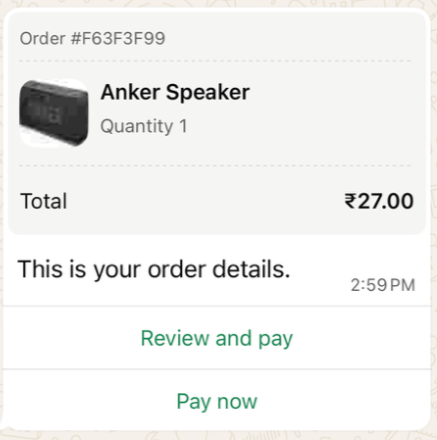
Example of an order_details message
Payment method variants
The examples above use a UPI intent link. For other payment methods, replace payment_settings with one of the following:
"payment_settings": [
  {
    "type": "upi_intent_link",
    "upi_intent_link": {
      "link": "upi://pay?pa=merchant_vpa&pn=Merchant%20Name&mc=mc_code&purpose=purpose_code&tr=transaction_record"
    }
  }
]
"payment_settings": [
  {
    "type": "payment_link",
    "payment_link": {
      "uri": "https://the-payment-link"
    }
  }
]
"payment_settings": [
  {
    "type": "payment_gateway",
    "payment_gateway": {
      "type": "razorpay",
      "configuration_name": "my-payment-config"
    }
  }
]
For a payment gateway, configuration_name is the name of your payment configuration and type is the provider.
order_details template
An order details template lets you send the order details outside the customer service window. The order_details object is passed as the parameter of the template's order details button.
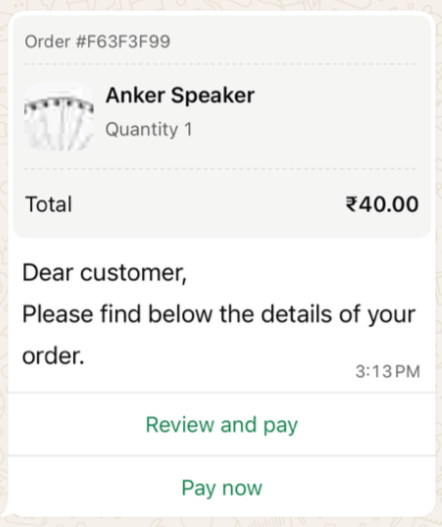
Example of an order_details template message
{
  "messages": {
    "authentication": {
      "productToken": "YOUR_PRODUCT_TOKEN"
    },
    "msg": [
      {
        "from": "00916098765432",
        "to": [
          { "number": "00916012345678" }
        ],
        "body": {
          "type": "auto",
          "content": "Here is your order summary."
        },
        "allowedChannels": ["WhatsApp"],
        "richContent": {
          "conversation": [
            {
              "template": {
                "whatsapp": {
                  "element_name": "order_details_in_payments",
                  "language": { "policy": "deterministic", "code": "en" },
                  "components": [
                    {
                      "type": "header",
                      "parameters": [
                        {
                          "type": "image",
                          "media": {
                            "mediaUri": "https://www.example.com/images/order.png",
                            "mimeType": "image/png"
                          }
                        }
                      ]
                    },
                    {
                      "type": "button",
                      "sub_type": "order_details",
                      "index": 0,
                      "parameters": [
                        {
                          "type": "action",
                          "action": {
                            "order_details": {
                              "reference_id": "F63F3F99",
                              "type": "digital-goods",
                              "payment_type": "upi",
                              "payment_configuration": "my-payment-config",
                              "currency": "INR",
                              "total_amount": { "value": 4000, "offset": 100 },
                              "payment_settings": [
                                {
                                  "type": "upi_intent_link",
                                  "upi_intent_link": {
                                    "link": "upi://pay?pa=anything@payu&pn=ABC&tr=877376394&am=40.00&cu=INR&mode=00&purpose=00&mc=5399&tn=877376394"
                                  }
                                }
                              ],
                              "order": {
                                "status": "pending",
                                "items": [
                                  {
                                    "retailer_id": "42703ed5a",
                                    "name": "Anker Speaker",
                                    "amount": { "value": 4000, "offset": 100 },
                                    "quantity": 1,
                                    "country_of_origin": "India",
                                    "importer_name": "CM.com",
                                    "importer_address": {
                                      "address_line1": "Saket District Centre, Sector 6, Pushp Vihar",
                                      "city": "New Delhi",
                                      "postal_code": "110017",
                                      "country_code": "IN"
                                    }
                                  }
                                ],
                                "subtotal": { "value": 4000, "offset": 100 },
                                "tax": { "value": 0, "offset": 100 },
                                "shipping": { "value": 0, "offset": 100 },
                                "discount": { "value": 0, "offset": 100 }
                              }
                            }
                          }
                        }
                      ]
                    }
                  ]
                }
              }
            }
          ]
        }
      }
    ]
  }
}
Update the order status
Send an order_status message whenever the status of an order changes, for example when you receive the payment or ship the order.
Order statuses
| Status | Use when… |
|---|---|
pending | The order has been created. This is the initial status. |
processing | You have received the payment. |
shipped / partially-shipped | Physical goods are in transit. |
completed | The service has been delivered or the item has arrived. |
canceled | The order is cancelled. Only possible before payment is captured. |
Payment statuses
| Status | Effect |
|---|---|
pending | The payment is pending. |
captured | A green Paid label with a tick is added to the user's order bubble. |
failed | The user is told the payment did not go through. |
Best practices
- Use the
expirationobject inorder_detailsfor time-sensitive offers or limited stock. When the order expires, the pay button is disabled automatically.- Use WhatsApp formatting in the body text to highlight important information, for example: Please complete your UPI payment within 15 minutes.
Interactive order_status message
| Field | Required | Description |
|---|---|---|
interactive.type | Yes | order_status |
body.text | Yes | Message text. |
action.name | Yes | review_order |
parameters.reference_id | Yes | The reference_id of the order. |
parameters.order.status | Yes | The new order status. |
parameters.order.description | No | Explanation shown to the user. |
{
  "messages": {
    "authentication": {
      "productToken": "YOUR_PRODUCT_TOKEN"
    },
    "msg": [
      {
        "from": "00916098765432",
        "to": [
          { "number": "00916012345678" }
        ],
        "body": {
          "type": "auto",
          "content": "Your order status has been updated."
        },
        "allowedChannels": ["WhatsApp"],
        "richContent": {
          "conversation": [
            {
              "interactive": {
                "type": "order_status",
                "body": {
                  "text": "This is the status of your order."
                },
                "action": {
                  "name": "review_order",
                  "parameters": {
                    "reference_id": "F63F3F99",
                    "order": {
                      "status": "pending",
                      "description": "Order will be cancelled if not paid by the expiration time."
                    }
                  }
                }
              }
            }
          ]
        }
      }
    ]
  }
}
order_status template
{
  "messages": {
    "authentication": {
      "productToken": "YOUR_PRODUCT_TOKEN"
    },
    "msg": [
      {
        "from": "00916098765432",
        "to": [
          { "number": "00916012345678" }
        ],
        "body": {
          "type": "auto",
          "content": "Your order status has been updated."
        },
        "allowedChannels": ["WhatsApp"],
        "richContent": {
          "conversation": [
            {
              "template": {
                "whatsapp": {
                  "element_name": "order_status_in_payments",
                  "language": { "policy": "deterministic", "code": "en" },
                  "components": [
                    {
                      "type": "order_status",
                      "parameters": [
                        {
                          "type": "order_status",
                          "order_status": {
                            "reference_id": "F63F3F99",
                            "order": {
                              "status": "processing",
                              "description": "Thanks for your order. We are working on it!"
                            }
                          }
                        }
                      ]
                    }
                  ]
                }
              }
            }
          ]
        }
      }
    ]
  }
}
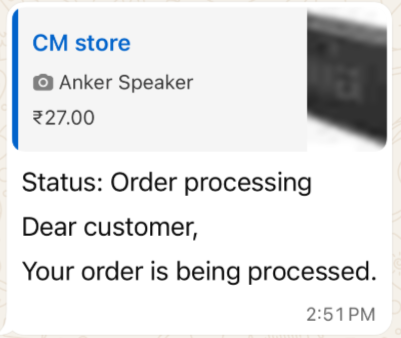
Example of an order_status message
Updated 16 days ago