
List messages
Overview
List messages offer a way to present users with a question and 2–5 answers from which they can select one. Once a user selects an item, it will be highlighted as selected, and the corresponding item text will be sent from the user to you as a reply. After making a selection, the user is able to change it. If the selection is changed, an additional message will be sent on the user's behalf to you. List messages are categorized as transactional and only available for transactional accounts.
Rules and restrictions
List messages support text formatting and emojis. Links are not supported.
| Field | Required | Remarks |
|---|---|---|
| text | Yes | Message text. Up to 85 UTF-8 character. |
| suggestions | Yes | Number of items, between 2 and 5. |
For each suggestion item, the following restrictions apply:
| Field | Required | Remark |
|---|---|---|
| label | Yes | Up to 50 UTF-8 characters per item |
| action | Yes | Always needs to be "Reply" |
List message example
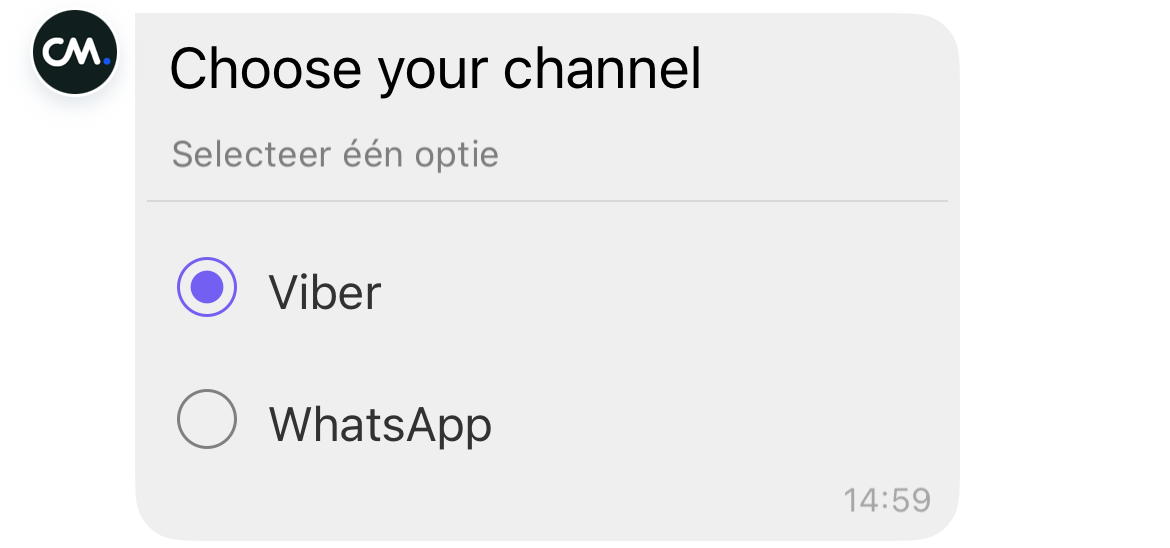
In the example below, we send a list message that contains two items.
{
    "messages": {
        "msg": [
            {
                "from": "",
                "to": [
                    {
                        "number": ""
                    }
                ],
                "body": {
                    "content": ""
                },
                "allowedChannels": [
                    "Viber"
                ],
                "richContent": {
                    "conversation": [
                        {
                            "text": "What's your favorite channel?"
                        }
                    ],
                    "suggestions": [
                        {
                            "action": "Reply",
                            "label": "Viber"
                        },
                        {
                            "action": "Reply",
                            "label": "WhatsApp"
                        }
                    ]
                }
            }
        ]
    }
}
Updated 9 months ago
Did this page help you?