
Payments Brazil
With WhatsApp Payments in Brazil, users can review an order and pay for it with Pix, boleto, a payment link or a saved card, directly from the conversation.
How it works
- The user places an order. The user selects products from your WhatsApp catalogue and sends you their cart.
- You send the order details. You send an
order_detailsmessage with the items, amounts and payment options. The user reviews the order and pays. - You update the order status. When you receive the payment, and as the order progresses, you send
order_statusmessages to keep the user informed.
Before you begin
- Your WhatsApp Business Account (WABA) must be Brazilian.
- A Meta product catalogue must be linked to your WABA.
- The user must have a Brazilian phone number. Messages to other numbers are rejected by Meta as undeliverable, because the message format is not supported for them.
Send the order details
The order_details message shows the order summary and the payment options. You can send it as an interactive message within the customer service window, or as a template outside it.
Requirements
currencymust beBRL.total_amountmust equal subtotal + tax + shipping − discount.action.namemust bereview_and_pay.order.statusmust bepending.reference_idmust be unique per order.
Unique reference IDs
Use a unique
reference_idfor every order, to avoid duplicates and to track payment status accurately. If you send severalorder_detailsmessages for the same order or invoice, add a sequence number to thereference_id.
Supported payment methods
payment_settings[].type | Method | Description |
|---|---|---|
pix_dynamic_code | Pix | A dynamic Pix code. The user copies the code and completes the payment in their banking app. |
boleto | Boleto | A Brazilian payment slip, identified by its digitable line. |
payment_link | Payment link | A secure link to a payment page. |
offsite_card_pay | One-click payment | Payment with a card the user has saved with you. Only available in templates. |
An interactive message can offer several payment methods at once: add several entries to payment_settings.
Amounts
All amounts are objects with a value and an offset. The actual amount is value ÷ offset. The offset must be 100.
{ "value": 50000, "offset": 100 }
This represents R$ 500,00.
Interactive order_details message
Fields
| Field | Required | Description |
|---|---|---|
interactive.type | Yes | order_details |
body.text | Yes | Message text. |
footer.text | No | Footer text. |
action.name | Yes | review_and_pay |
parameters.reference_id | Yes | Your unique order reference. |
parameters.type | Yes | digital-goods or physical-goods. |
parameters.payment_type | Yes | br |
parameters.payment_settings | Yes | One or more payment methods. See Supported payment methods. |
parameters.currency | Yes | BRL |
parameters.total_amount | Yes | Total amount. |
parameters.order.status | Yes | pending |
parameters.order.items[] | Yes | The items: retailer_id, name, amount and quantity. |
parameters.order.subtotal | Yes | Sum of the item amounts. |
parameters.order.tax | No | Tax amount, with optional description. |
parameters.order.shipping | No | Shipping costs, with optional description. |
parameters.order.discount | No | Discount, with optional description. |
Example
The example offers three payment methods in one message.
{
  "messages": {
    "authentication": {
      "productToken": "YOUR_PRODUCT_TOKEN"
    },
    "msg": [
      {
        "from": "00551198765432",
        "to": [
          { "number": "00551112345678" }
        ],
        "body": {
          "type": "auto",
          "content": "Here is your order summary."
        },
        "allowedChannels": ["WhatsApp"],
        "richContent": {
          "conversation": [
            {
              "interactive": {
                "type": "order_details",
                "body": {
                  "text": "Here is your order summary. Please choose how you would like to pay."
                },
                "action": {
                  "name": "review_and_pay",
                  "parameters": {
                    "reference_id": "order-ref-12345",
                    "type": "digital-goods",
                    "payment_type": "br",
                    "payment_settings": [
                      {
                        "type": "pix_dynamic_code",
                        "pix_dynamic_code": {
                          "code": "00020101021226700014br.gov.bcb.pix2548pix.example.com...",
                          "merchant_name": "Account holder name",
                          "key": "39580525000189",
                          "key_type": "CNPJ"
                        }
                      },
                      {
                        "type": "boleto",
                        "boleto": {
                          "digitable_line": "03399026944140000002628346101018898510000008848"
                        }
                      },
                      {
                        "type": "payment_link",
                        "payment_link": {
                          "uri": "https://www.example.com/pay/order-ref-12345"
                        }
                      }
                    ],
                    "currency": "BRL",
                    "total_amount": { "value": 50000, "offset": 100 },
                    "order": {
                      "status": "pending",
                      "items": [
                        {
                          "retailer_id": "1234567",
                          "name": "Cake",
                          "amount": { "value": 50000, "offset": 100 },
                          "quantity": 1
                        }
                      ],
                      "subtotal": { "value": 50000, "offset": 100 },
                      "tax": { "value": 0, "offset": 100, "description": "Tax" }
                    }
                  }
                }
              }
            }
          ]
        }
      }
    ]
  }
}
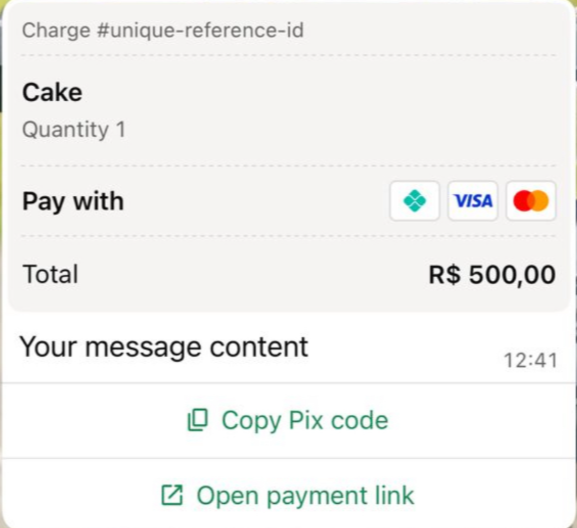
Several payment methods in one interactive message
Payment method objects
To offer a single method, use one of these entries in payment_settings:
"payment_settings": [
  {
    "type": "pix_dynamic_code",
    "pix_dynamic_code": {
      "code": "00020101021226700014br.gov.bcb.pix2548pix.example.com...",
      "merchant_name": "Account holder name",
      "key": "39580525000189",
      "key_type": "CNPJ"
    }
  }
]
"payment_settings": [
  {
    "type": "boleto",
    "boleto": {
      "digitable_line": "03399026944140000002628346101018898510000008848"
    }
  }
]
"payment_settings": [
  {
    "type": "payment_link",
    "payment_link": {
      "uri": "https://www.example.com/pay/order-ref-12345"
    }
  }
]
"payment_settings": [
  {
    "type": "offsite_card_pay",
    "offsite_card_pay": {
      "last_four_digits": "5235",
      "credential_id": "1234567"
    }
  }
]
| Object | Field | Description |
|---|---|---|
pix_dynamic_code | code | The dynamic Pix code (copia e cola). |
merchant_name | Name of the account holder. | |
key | Pix key. | |
key_type | Type of Pix key, for example CNPJ. | |
boleto | digitable_line | Digitable line of the boleto. |
payment_link | uri | URL of the payment page. |
offsite_card_pay | last_four_digits | Last four digits of the saved card, shown to the user. |
credential_id | Your identifier of the saved card. |
order_details template
An order details template lets you send the order details outside the customer service window. It is also the only way to offer one-click payments.
Create the template
Order details templates can be in the Utility or Marketing category. See Meta's categorisation guidelines.
In WhatsApp Manager
Your business portfolio must be linked to a WhatsApp Business Account. In WhatsApp Manager, under Account tools:
- Click Create template.
- Select the Utility or Marketing category.
- Select the Order details format and click Next.
- Enter the template name and locale. For multiple locales, create a variant per locale.
- Add a header (text, image or document), body and optional footer.
- Click Submit.
Once approved, the template status changes to Active.
Through Meta's template API
Create a template with display_format set to ORDER_DETAILS and a button of type ORDER_DETAILS. See Meta's order details template documentation.
curl -X POST 'https://graph.facebook.com/<API_VERSION>/<WHATSAPP_BUSINESS_ACCOUNT_ID>/message_templates' \
  -H 'Authorization: Bearer <ACCESS_TOKEN>' \
  -H 'Content-Type: application/json' \
  -d '{
    "name": "<TEMPLATE_NAME>",
    "language": "<LANGUAGE_CODE>",
    "category": "UTILITY",
    "display_format": "ORDER_DETAILS",
    "components": [
      { "type": "HEADER", "format": "TEXT", "text": "<HEADER_TEXT>" },
      { "type": "BODY", "text": "<BODY_TEXT>" },
      { "type": "FOOTER", "text": "<FOOTER_TEXT>" },
      {
        "type": "BUTTONS",
        "buttons": [
          { "type": "ORDER_DETAILS", "text": "<BUTTON_TEXT>" }
        ]
      }
    ]
  }'
category is UTILITY or MARKETING. The header format is TEXT, IMAGE or DOCUMENT.
Send the template
The order_details object is passed as the parameter of the template's order details button. It has the same fields as in the interactive message.
{
  "messages": {
    "authentication": {
      "productToken": "YOUR_PRODUCT_TOKEN"
    },
    "msg": [
      {
        "from": "00551198765432",
        "to": [
          { "number": "00551112345678" }
        ],
        "body": {
          "type": "auto",
          "content": "Here is your order summary."
        },
        "allowedChannels": ["WhatsApp"],
        "richContent": {
          "conversation": [
            {
              "template": {
                "whatsapp": {
                  "element_name": "order_details_cart",
                  "language": { "policy": "deterministic", "code": "en" },
                  "components": [
                    {
                      "type": "button",
                      "sub_type": "order_details",
                      "index": 0,
                      "parameters": [
                        {
                          "type": "action",
                          "action": {
                            "order_details": {
                              "reference_id": "order-ref-12346",
                              "type": "digital-goods",
                              "payment_type": "br",
                              "payment_settings": [
                                {
                                  "type": "pix_dynamic_code",
                                  "pix_dynamic_code": {
                                    "code": "00020101021226700014br.gov.bcb.pix2548pix.example.com...",
                                    "merchant_name": "Account holder name",
                                    "key": "39580525000189",
                                    "key_type": "CNPJ"
                                  }
                                }
                              ],
                              "currency": "BRL",
                              "total_amount": { "value": 50000, "offset": 100 },
                              "order": {
                                "status": "pending",
                                "items": [
                                  {
                                    "retailer_id": "1234567",
                                    "name": "Cake",
                                    "amount": { "value": 50000, "offset": 100 },
                                    "quantity": 1
                                  }
                                ],
                                "subtotal": { "value": 50000, "offset": 100 },
                                "tax": { "value": 0, "offset": 100, "description": "Tax" }
                              }
                            }
                          }
                        }
                      ]
                    }
                  ]
                }
              }
            }
          ]
        }
      }
    ]
  }
}
{
  "messages": {
    "authentication": {
      "productToken": "YOUR_PRODUCT_TOKEN"
    },
    "msg": [
      {
        "from": "00551198765432",
        "to": [
          { "number": "00551112345678" }
        ],
        "body": {
          "type": "auto",
          "content": "Here is your order summary."
        },
        "allowedChannels": ["WhatsApp"],
        "richContent": {
          "conversation": [
            {
              "template": {
                "whatsapp": {
                  "element_name": "order_details_cart",
                  "language": { "policy": "deterministic", "code": "en" },
                  "components": [
                    {
                      "type": "button",
                      "sub_type": "order_details",
                      "index": 0,
                      "parameters": [
                        {
                          "type": "action",
                          "action": {
                            "order_details": {
                              "reference_id": "order-ref-12347",
                              "type": "digital-goods",
                              "payment_type": "br",
                              "payment_settings": [
                                {
                                  "type": "offsite_card_pay",
                                  "offsite_card_pay": {
                                    "last_four_digits": "5235",
                                    "credential_id": "1234567"
                                  }
                                }
                              ],
                              "currency": "BRL",
                              "total_amount": { "value": 50000, "offset": 100 },
                              "order": {
                                "status": "pending",
                                "items": [
                                  {
                                    "retailer_id": "1234567",
                                    "name": "Cake",
                                    "amount": { "value": 50000, "offset": 100 },
                                    "quantity": 1
                                  }
                                ],
                                "subtotal": { "value": 50000, "offset": 100 },
                                "tax": { "value": 0, "offset": 100, "description": "Tax" }
                              }
                            }
                          }
                        }
                      ]
                    }
                  ]
                }
              }
            }
          ]
        }
      }
    ]
  }
}
For boleto or a payment link, replace payment_settings with the matching payment method object.
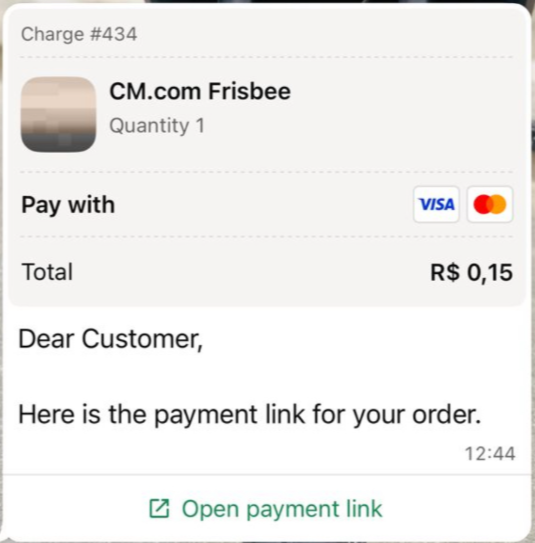
Example of a payment link template message
Update the order status
Send an order_status message whenever the status of an order or its payment changes. When you receive a payment (from your payment provider or webhook), send an order_status message with the payment object.
Order statuses
| Status | Use when… |
|---|---|
pending | The order has been created. This is the initial status. |
processing | You have received the payment. |
shipped / partially-shipped | Physical goods are in transit. |
completed | The service has been delivered or the item has arrived. |
canceled | The order is cancelled. Only possible before payment is captured. |
Payment statuses
| Status | Effect |
|---|---|
pending | The payment is pending. |
captured | A green Paid label with a tick is added to the user's order bubble. |
failed | The user is told the payment did not go through. |
Best practices
- For time-sensitive offers or limited stock, add an
expirationto the order. When the order expires, the pay button is disabled automatically.- Use WhatsApp formatting in the body text to highlight important information, for example: Please complete your Pix payment within 15 minutes.
Interactive order_status message
| Field | Required | Description |
|---|---|---|
interactive.type | Yes | order_status |
body.text | Yes | Message text. |
footer.text | No | Footer text. |
action.name | Yes | review_order |
parameters.reference_id | Yes | The reference_id of the order. |
parameters.order.status | Yes | The new order status. |
parameters.payment.status | No | The new payment status. |
parameters.payment.timestamp | No | Time of the payment, as a UNIX timestamp. |
{
  "messages": {
    "authentication": {
      "productToken": "YOUR_PRODUCT_TOKEN"
    },
    "msg": [
      {
        "from": "00551198765432",
        "to": [
          { "number": "00551112345678" }
        ],
        "body": {
          "type": "auto",
          "content": "We have received your payment."
        },
        "allowedChannels": ["WhatsApp"],
        "richContent": {
          "conversation": [
            {
              "interactive": {
                "type": "order_status",
                "body": {
                  "text": "We have received your payment. Thank you!"
                },
                "footer": {
                  "text": "CM.com"
                },
                "action": {
                  "name": "review_order",
                  "parameters": {
                    "reference_id": "order-ref-12345",
                    "order": {
                      "status": "processing"
                    },
                    "payment": {
                      "status": "captured",
                      "timestamp": 1722445231
                    }
                  }
                }
              }
            }
          ]
        }
      }
    ]
  }
}
Updated 16 days ago