
WhatsApp Business-scoped User IDs
Proposed CM.com Business Messaging API changes to support Business-scoped User IDs (BSUID) for outbound messages, incoming messages and status reports.
WhatsApp is introducing optional usernames. When a user adopts a username, their phone number is no longer guaranteed to be shared with businesses. To let you keep addressing these users, Meta introduces the Business-scoped User ID (BSUID): an identifier that uniquely identifies a WhatsApp user within your business portfolio.
This page describes how the CM.com Business Messaging API supports BSUIDs for sending messages, incoming messages and status reports.
What changes at a glance
- Sending (MT):
to.numberaccepts a BSUID as well as a phone number. There is no new endpoint or field.- Incoming messages (MO): the
fromobject contains a newuser_id,parent_user_idandusername. If the phone number is not shared,from.numbercontains the BSUID instead.- Status reports (SR): the
recipientobject contains the same- No breaking changes: integrations that only use phone numbers keep working. All new fields are additive.
About BSUIDs
| Property | Description |
|---|---|
| Format | An ISO 3166 alpha-2 country code, a full stop and up to 128 alphanumeric characters, for example NL.84827364598365. |
| Uniqueness | Generated automatically, unique per user and business portfolio. |
| Scope | Valid from any phone number in any WABA within the same business portfolio. The same user has a different BSUID in every other portfolio. |
| Lifetime | Regenerated when the user changes their phone number. See BSUID changes. |
| Restrictions | Cannot be used for authentication templates (one_tap, zero_tap and copy_code). No fallback to other channels, such as SMS. |
When is the phone number shared?
The user's phone number is included in webhooks when either:
- Your business phone number has interacted with the user in the last 30 days (sent to or received from), or
- The user is in your contact book.
Otherwise, only the BSUID is available. Make sure your integration can handle messages without a phone number.
Sending a message to a BSUID
Place the BSUID in the existing to.number field. The platform recognises the identifier by its format:
| Format | Example | Treated as |
|---|---|---|
00 + country code + number | 00316012345678 | Phone number |
<country code>.<alphanumeric> | NL.84827364598365 | BSUID |
<country code>.ENT.<alphanumeric> | NL.ENT.11815799212886844830 | Parent BSUID |
One identifier per recipient
Each
toentry must contain either a phone number or a BSUID, not both.
{
  "messages": {
    "authentication": {
      "productToken": "YOUR_PRODUCT_TOKEN"
    },
    "msg": [
      {
        "from": "00316098765432",
        "to": [
          { "number": "NL.84827364598365" }
        ],
        "body": {
          "type": "auto",
          "content": "Fallback text"
        },
        "allowedChannels": ["WhatsApp"],
        "richContent": {
          "conversation": [
            { "text": "Hello from CM.com" }
          ]
        }
      }
    ]
  }
}
Keep in mind:
- Set
allowedChannelsto["WhatsApp"]. A BSUID cannot be used on other channels, so fallback is not possible. - Sending to a BSUID from a phone number in a different business portfolio fails. The rejection appears in your status report.
- Authentication templates must be sent to a phone number.
- Max price (
bid_spec) is not supported for BSUID recipients.
Receiving messages
The from object of every inbound WhatsApp message contains a whatsapp object. This applies to all inbound message types described in WhatsApp inbound.
| Field | Description |
|---|---|
from.number | The sender's phone number. If the phone number is not shared, this contains the BSUID instead. |
from.whatsapp.user_id | New. The sender's BSUID. |
from.whatsapp.parent_user_id | New. The sender's parent BSUID. Only present if parent BSUIDs are enabled for your account. |
from.whatsapp.username | New. The sender's WhatsApp username, for example @samuelbeckett. Empty or absent unless the user has adopted a username. |
{
  "reference": "wamid.HBgLMzE2MTIzNDU2NzgVAgASGBQzQUQxMjM0NTY3ODkwQUJDREVGAA==",
  "messageContext": "",
  "from": {
    "number": "0031612345678",
    "name": "Samuel Beckett",
    "whatsapp": {
      "user_id": "NL.84827364598365"
    }
  },
  "to": {
    "number": "0031607453450"
  },
  "message": {
    "text": "Hello, I'd like to know your opening hours.",
    "media": {
      "mediaUri": "",
      "contentType": "",
      "title": ""
    },
    "custom": {
      "meta_received_time": "2026-05-04T08:32:30"
    }
  },
  "groupings": ["", "", ""],
  "timeUtc": "2026-05-04T08:32:33",
  "channel": "WhatsApp"
}
{
  "reference": "wamid.HBgLMzE2MTIzNDU2NzgVAgASGBQzQUUxMjM0NTY3ODkwQUJDREVGAA==",
  "messageContext": "",
  "from": {
    "number": "NL.84827364598365",
    "name": "Samuel Beckett",
    "whatsapp": {
      "user_id": "NL.84827364598365",
      "parent_user_id": "NL.ENT.20351749385746821093",
      "username": "@samuelbeckett"
    }
  },
  "to": {
    "number": "0031607453450"
  },
  "message": {
    "text": "How long do I have to wait for Godot?",
    "media": {
      "mediaUri": "",
      "contentType": "",
      "title": ""
    },
    "custom": {
      "meta_received_time": "2026-05-04T08:32:30"
    }
  },
  "groupings": ["", "", ""],
  "timeUtc": "2026-05-04T08:32:33",
  "channel": "WhatsApp"
}
Status reports
The recipient object of WhatsApp status reports, in both JSON and XML, contains a whatsapp object. The to field still echoes the identifier you used when sending (phone number or BSUID).
| Field | Description |
|---|---|
to | The identifier you used in the original message: a phone number or a BSUID. |
recipient.number | The recipient's phone number, or the BSUID if the phone number is not shared. |
recipient.whatsapp.user_id | New. The recipient's BSUID, regardless of how you addressed the message. Included in accepted, delivered and read status reports. In failed status reports for messages sent to a phone number, whatsapp is null. |
recipient.whatsapp.parent_user_id | New. The recipient's parent BSUID. Empty unless parent BSUIDs are enabled. |
recipient.whatsapp.username | New. The recipient's WhatsApp username. Empty unless the user has adopted a username. |
Status codes are unchanged: 0 accepted, 1 rejected, 2 delivered, 3 failed, 4 read. BSUID-related failures are reported in the existing errorCode and errorDescription fields, like any other failure.
JSON
{
  "messages": {
    "msg": {
      "received": "2026-05-04T15:38:56",
      "reference": "reference2",
      "to": "0031612345678",
      "recipient": {
        "number": "0031612345678",
        "whatsapp": {
          "user_id": "NL.84827364598365"
        }
      },
      "status": {
        "code": "2",
        "errorCode": "",
        "errorDescription": "Delivered"
      },
      "operator": ""
    }
  }
}
{
  "messages": {
    "msg": {
      "received": "2026-05-04T15:38:56",
      "reference": "reference2",
      "to": "0031612345678",
      "recipient": {
        "number": "0031612345678",
        "whatsapp": {
          "user_id": "NL.84827364598365",
          "username": "@pablomorales"
        }
      },
      "status": {
        "code": "2",
        "errorCode": "",
        "errorDescription": "Delivered"
      },
      "operator": ""
    }
  }
}
{
  "messages": {
    "msg": {
      "received": "2026-05-04T15:38:56",
      "reference": "reference2",
      "to": "0031612345678",
      "recipient": {
        "number": "0031612345678",
        "whatsapp": {
          "user_id": "NL.84827364598365",
          "parent_user_id": "NL.ENT.20351749385746821093",
          "username": "@pablomorales"
        }
      },
      "status": {
        "code": "2",
        "errorCode": "",
        "errorDescription": "Delivered"
      },
      "operator": ""
    }
  }
}
{
  "messages": {
    "msg": {
      "received": "2026-05-04T15:38:56",
      "reference": "reference2",
      "to": "NL.84827364598365",
      "recipient": {
        "number": "NL.84827364598365",
        "whatsapp": {
          "user_id": "NL.84827364598365"
        }
      },
      "status": {
        "code": "2",
        "errorCode": "",
        "errorDescription": "Delivered"
      },
      "operator": ""
    }
  }
}
{
  "messages": {
    "msg": {
      "received": "2026-06-17T13:57:13",
      "reference": "reference2",
      "to": "0031612345678",
      "recipient": {
        "number": "",
        "whatsapp": null
      },
      "status": {
        "code": "1",
        "errorCode": "87",
        "errorDescription": "Message marked as failed by CM after 24 hours without receiving final status from the operator"
      },
      "operator": ""
    }
  }
}
XML
<messages>
  <msg>
    <received>2026-05-04T15:38:56</received>
    <to>0031612345678</to>
    <recipient>
      <number>0031612345678</number>
      <whatsapp>
        <user_id>NL.84827364598365</user_id>
        <parent_user_id></parent_user_id>
        <username></username>
      </whatsapp>
    </recipient>
    <reference>reference2</reference>
    <status>
      <code>2</code>
      <errorCode></errorCode>
      <errorDescription>Delivered</errorDescription>
    </status>
    <operator></operator>
  </msg>
</messages>
<messages>
  <msg>
    <received>2026-05-04T15:38:56</received>
    <to>NL.84827364598365</to>
    <recipient>
      <number>0031612345678</number>
      <whatsapp>
        <user_id>NL.84827364598365</user_id>
        <parent_user_id></parent_user_id>
        <username>@pablomorales</username>
      </whatsapp>
    </recipient>
    <reference>reference2</reference>
    <status>
      <code>2</code>
      <errorCode></errorCode>
      <errorDescription>Delivered</errorDescription>
    </status>
    <operator></operator>
  </msg>
</messages>
Identifier reference
| Flow | Your identifier field | Phone number | whatsapp.user_id | whatsapp.parent_user_id | whatsapp.username |
|---|---|---|---|---|---|
| Sending (MT) | to.number: phone number or BSUID | n/a | n/a | n/a | n/a |
| Incoming (MO) | to.number: your business number | from.number, or the BSUID if not shared | Always populated | Empty unless parent BSUIDs are enabled | Empty unless the user has one |
| Status (SR) | to: echo of what you sent | recipient.number, or the BSUID if not shared | Populated for accepted, delivered and read | Empty unless parent BSUIDs are enabled | Empty unless the user has one |
BSUID changes
When a user changes their WhatsApp phone number, their BSUID is regenerated. CM.com notifies you with a system message on your MO webhook:
message.custom.message_typeissystem.message.textcontains the old and the new BSUID.
When you receive this event, extract both BSUIDs from message.text, replace the old BSUID in your records and stop sending to it.
{
  "reference": "wamid.HBgLZjk3MmRhYjZjFQIAEhgKQTI3MzU0Q0Y4QTRGMzRBNjAA",
  "messageContext": "",
  "from": {
    "number": "0031612345678",
    "whatsapp": {
      "user_id": "NL.84827364598365",
      "parent_user_id": "",
      "username": "@pablomorales"
    }
  },
  "to": {
    "number": "0031607453450"
  },
  "message": {
    "text": "User A changed BSUID from NL.84827364598365 to NL.99999999999999",
    "media": {
      "mediaUri": "",
      "contentType": "",
      "title": ""
    },
    "custom": {
      "meta_received_time": "2026-05-06T20:12:05",
      "message_type": "system"
    },
    "error": ""
  },
  "groupings": ["", "", ""],
  "time": "2026-05-06 22:12:07",
  "timeUtc": "2026-05-06T20:12:07",
  "channel": "WhatsApp"
}
Parent BSUIDs
Businesses that operate WABAs across several linked business portfolios can opt in to parent BSUIDs. A parent BSUID has the format <country code>.ENT.<alphanumeric>, for example NL.ENT.11815799212886844830, and can be used from any business phone number in any WABA across the linked portfolios.
If parent BSUIDs are enabled for your account:
- Inbound messages contain
from.whatsapp.parent_user_id. - Status reports contain
recipient.whatsapp.parent_user_id. - When sending, you can put either the BSUID or the parent BSUID in
to.number. The platform routes the message based on theENTsegment.
Migration guide
- Parse tolerantly. Make sure your MO and status report handlers accept the new
whatsappobject and handle messages without a phone number. - Store the BSUID. Save the BSUID with your user records as soon as it appears in inbound traffic. Treat it as the durable identifier, since the phone number may not be shared in future.
- Keep using phone numbers where required. Authentication templates must still be sent to phone numbers.
- Send to BSUIDs. For users whose phone number is no longer shared, place the BSUID in
to.number. - Handle BSUID changes. Process the BSUID change system message and replace stored BSUIDs.
Business usernames
Your business can also adopt a username. Users can then find your business by searching for the exact username, and it is shown on your profile.
Some usernames may already be reserved for you. Once your request is approved, the username becomes active as soon as usernames are available in your country.
The following requests are made directly to Meta's Graph API.
Check available usernames
curl 'https://graph.facebook.com/<API_VERSION>/<BUSINESS_PHONE_NUMBER_ID>/username_suggestions' \
  -H 'Authorization: Bearer <ACCESS_TOKEN>'
Request a username
curl -X POST 'https://graph.facebook.com/<API_VERSION>/<BUSINESS_PHONE_NUMBER_ID>/username' \
  -H 'Content-Type: application/json' \
  -H 'Authorization: Bearer <ACCESS_TOKEN>' \
  -d '{
    "username": "<DESIRED_USERNAME>",
    "transfer_action": "none"
  }'
| Field | Required | Description |
|---|---|---|
username | Yes | The username you want. |
transfer_action | No | What to do if the username is already assigned to another phone number in your portfolio. none (default): the request fails with error 147005. force_transfer: the username is moved to this phone number. |
A successful response contains a status:
| Status | Meaning |
|---|---|
approved | The username is approved and becomes visible once usernames are generally available. |
reserved | The username is reserved and approved, but not yet visible. It becomes visible on general rollout. |
Error codes
| Code | Description | Cause and solution |
|---|---|---|
10 | App lacks permission | The token's system user needs Full control, or Partial access (phone numbers), on the WABA. |
33 | Invalid ID | Invalid phone number ID, deleted WABA, or missing whatsapp_business_management permission. |
100 | Invalid parameter | The username does not match the required format. |
147001 | Username not available | The username is already taken, failed internal checks or is not available. Try a different username. |
147002 | Account not eligible | The business portfolio needs a higher tier. |
147003 | Facebook Page not linked | Link the phone number to the Facebook Page that already holds this username. |
147004 | Instagram account not linked | Link the phone number to the Instagram account that already holds this username. |
147005 | Username transfer required | The username is assigned to another phone number in your portfolio. Resend the request with "transfer_action": "force_transfer". |
133010 | Account not registered | Register the business phone number for API use first. |
Request phone number from users
If you only have a user's BSUID, you can ask them to share their phone number with a request contact info button. The button can be added to Utility and Marketing templates, or sent as an interactive message.
When the user taps the button, their phone number is shared in the conversation and you receive a contact message with origin set to contact_request. If the contact book feature is enabled, the number is also added to your contact book.
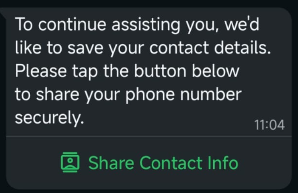
Request contact info message
Sending the request
The examples show the conversation item. For the template version, the button is defined in the approved template.
{
  "interactive": {
    "type": "request_contact_info",
    "body": {
      "text": "To continue assisting you, we'd like to save your contact details. Please tap the button below to share your phone number securely."
    },
    "action": {
      "name": "request_contact_info"
    }
  }
}
{
  "template": {
    "whatsapp": {
      "element_name": "request_contact_info",
      "language": { "policy": "deterministic", "code": "en" },
      "components": []
    }
  }
}
Receiving the phone number
{
  "reference": "wamid.HBgLMzQ2OD14aef4EAFzNEFCMzREOAA=",
  "messageContext": "",
  "from": {
    "number": "0031612345678",
    "name": "John Doe",
    "whatsapp": {
      "user_id": "NL.84827364598365"
    }
  },
  "to": {
    "number": "0031607453450"
  },
  "message": {
    "text": "",
    "media": {
      "mediaUri": "",
      "contentType": "",
      "title": ""
    },
    "custom": {
      "contacts": [
        {
          "vcard": "QkVHSU46VkNBUkQKVkVSU0lPTjozLjAKTjo7SmVzczs7OwpGTjpKZzClRFTDt0eXBlPU1vYmlsZTt3YWlkPTM0Njg1MTIwNDczOiszNCA2ODUgMTIgMDQgNzMKRU5EOlZDQVJE",
          "origin": "contact_request",
          "addresses": null,
          "birthday": null,
          "emails": null,
          "name": {
            "formatted_name": "John Doe",
            "first_name": "John",
            "last_name": "Doe",
            "middle_name": null,
            "suffix": null,
            "prefix": null
          },
          "org": null,
          "phones": [
            {
              "phone": "+31 6 12345678",
              "type": "MOBILE",
              "wa_id": "31612345678"
            }
          ],
          "urls": null
        }
      ],
      "meta_received_time": "2026-07-24T08:26:53",
      "message_type": "contacts"
    },
    "error": ""
  },
  "groupings": ["", "", ""],
  "time": "2026-07-24 10:26:54",
  "timeUtc": "2026-07-24T08:26:54",
  "channel": "WhatsApp"
}
Related documentation
Updated 16 days ago