
Payment Options, Usage & Billing
This guide explains how billing works for the Email Gateway: the payment options available, what counts as a billable event, where to monitor your usage, and how invoicing works.
Payment options
There are four payment options. Which one applies to your account is set up during onboarding and shown in your account settings.
| Plan | How it works | Billing model | Included volume | Overage |
|---|---|---|---|---|
| Free account | For testing and very low-volume sending | No cost | 1 domain, 100 emails/day | Sending is blocked once the daily limit is reached |
| Prepaid | You top up a balance and send against it | Balance is deducted per accepted message | Determined by your balance, not a fixed volume | Sending stops when your balance runs out; top up to resume |
| Pay-as-you-go (PAYG) | Postpaid: you send first, get billed after | Charged per bucket of 1,000 accepted messages | No fixed monthly volume | Not applicable: you're billed for actual usage each period |
| Bundles | A fixed monthly fee for a set volume of emails | Fixed monthly fee, plus overage if you exceed the bundle | Fixed monthly allowance (set per contract) | Charged per bucket of 1,000 accepted messages sent over your monthly allowance |
Free account
- Hard-capped at 100 emails per day and 1 sending domain.
- Intended for evaluation and low-volume use, not production traffic.
- No invoicing: there's no cost associated with this plan.
Prepaid
- You add funds to a balance up front.
- Each accepted message deducts from that balance in real time.
- There's no fixed "monthly limit" in the same sense as Bundles. Your effective limit is however much balance you have available.
- Once the balance is spent, sending is paused until you top up again.
Pay-as-you-go (PAYG)
- No prepayment or fixed allowance; you send, and usage is tallied.
- Billed per bucket of 1,000 accepted messages sent in the billing period.
- Because there's no fixed limit, there's no "overage" concept; all usage is simply billed.
Bundles
- You pay a fixed monthly fee for a set number of emails (your monthly allowance).
- If you exceed your allowance in a given month, you're charged an overage fee per bucket of 1,000 messages sent above the limit.
- Your remaining allowance and reset date are visible in the dashboard. See "Monitoring your usage" below.
Billable events
The billable event is the accepted message. A message only counts toward usage and billing once it has been accepted for delivery.
- Rejected messages are not charged. If a message is rejected (for example, due to validation errors or recipient in suppression list), it does not count against your usage or your bill.
- This applies consistently across all four payment options: Free, Prepaid, PAYG, and Bundles.
Messages sent to @sink.cm.com
@sink.cm.comIf you send messages to an @sink.cm.com address while in integration (test) mode, be aware that:
- These messages do contribute to your monthly usage limit, in the same way live traffic does.
- If you're on a pay-as-you-go plan, these messages are counted as billable usage. You will be charged for them per the standard PAYG bucket pricing.
In short: sending to @sink.cm.com is useful for validating your integration, but it is not "free" traffic from a usage or billing perspective. Plan your test volume accordingly, especially close to a billing period reset or a Bundle allowance limit.
Monitoring your usage
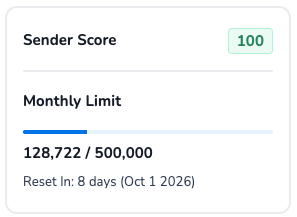
You can check your current usage at any time in the dashboard, at the bottom of the side navigation. This widget shows:
- Sender Score: your current sending reputation score.
- Monthly Limit: a progress bar showing messages sent vs. your monthly allowance (e.g.
128,722 / 500,000). - Reset In: a countdown to when your usage resets, along with the reset date (e.g.
8 days (Oct 1, 2026)).
This is the fastest way to see how close you are to your monthly limit (Bundles) or how much usage has accrued so far in the current period (PAYG), without waiting for an invoice.
Invoicing
At the end of each billing period, CM.com generates an invoice based on your plan and actual usage in that period:
- Free accounts are not invoiced; there is no associated cost.
- Prepaid accounts are settled in real time as your balance is deducted, so there is no separate usage invoice. You'll instead see invoices for your balance top-ups.
- PAYG and Bundle accounts receive an invoice reflecting the period's usage: for PAYG, total buckets of 1,000 accepted messages; for Bundles, the fixed monthly fee plus any overage buckets.
Updated about 1 month ago