OTP

Send out a Voice OTP (one time password).

Recipes
🦉
Sending a Voice OTP
Open Recipe
Recent Requests
Log in to see full request history
TimeStatusUser Agent
Retrieving recent requests…
LoadingLoading…

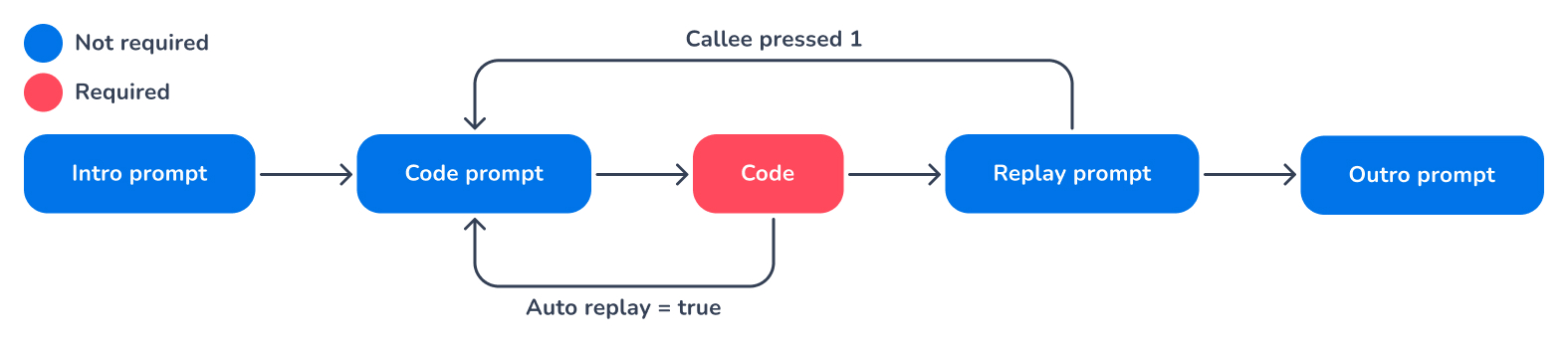
Application flow

Custom OTP audio files

In order to use custom audio files with the OTP app, you need to upload a set of audio files in the following directory structure using the Voice Management App:

/spelling/en-GB/*.wav

Where ‘en-GB’ is the language (including locale) of the set. Inside this folder, you need to upload a .wav file for every number or letter you want to be able to read aloud, like:

0.wav
1.wav
2.wav
a.wav
b.wav
c.wav

📘

For these custom audio files to work properly, please make sure that their filenames are in lowercase.

Voicemail detection

🚧

Important note

Voicemail detection is not available for OTP.

Body Params

Details of the OTP instruction.

string | null

Optional string that allows you to uniquely identify the placed outbound call. Its value is also included
in the callback and Call Detail Records (CDRs).

string | null

The number to dial. When the number is invalid, the request will be rejected. Must be in valid international
E.164 format.

callees
array of strings | null

List of multiple numbers to dial. When the list contains one or more invalid numbers, the request will be
rejected. Must be in valid international E.164 format.

callees
string
required
length between 1 and 24

The caller ID to display on the recipient's phone. Must be in valid international E.164 format.

boolean

Indicates whether the caller ID should be hidden. Defaults to false.

uri | null

URL that will be called when the call is finished. The body of this POST request will contain details about
the call or calls.

int32 | null
10 to 60

Determines how long the Voice API will wait for the callee to answer the call. Cancels the ringing call
after the timeout period exceeded. Defaults to 60.

string | null

Optional prompt to play when the call is first answered. This can be either TTS or SSML, or the path to an
audio file in your Voice Audio Manager.

string
enum

The type of the prompt, to distinguish between a filename and a string that needs to be tts-ed.

Allowed:
string | null

Optional prompt to play right before playing the actual OTP code. This can be either TTS or SSML, or the
path to an audio file in your Voice Audio Manager. This prompt is also replayed when the code is replayed.

string
enum

The type of the prompt, to distinguish between a filename and a string that needs to be tts-ed.

Allowed:
string
required
length between 1 and 64

The code to read to the caller. Note that this code is read character per character, not as a word or number.

string
enum

The type of the OTP code

Allowed:
string | null

Optional prompt instructing the callee to press 1 to replay the OTP. This can be either TTS or SSML, or the
path to an audio file in your Voice Audio Manager.

string
enum

The type of the prompt, to distinguish between a filename and a string that needs to be tts-ed.

Allowed:
string | null

Optional prompt instructing the callee to press 1 to replay the Notification. This can be either TTS or
SSML, or the path to an audio file in your Voice Audio Manager.

string
enum

The type of the prompt, to distinguish between a filename and a string that needs to be tts-ed.

Allowed:
int32 | null
0 to 3

The number of times the OTP can be replayed.

boolean | null

Whether to automatically replay the OTP. Defaults to false.

voice
object

The properties in this class are used to select the required TTS voice.

string
enum

The type that determines the flow of Voicemail detection.

Allowed:
Responses

401

Unauthorized

Language
Credentials
Header
LoadingLoading…
Response
Click Try It! to start a request and see the response here! Or choose an example:
application/json