
Status Transitions
This page explains the possible status transitions a transaction could go through and what they mean.
iDEAL becomes Wero
You’ll soon see a new logo: iDEAL | Wero.
iDEAL is evolving into "Wero", a new pan-European payment solution by the European Payments Initiative (EPI). The first step is the introduction of the mandatory iDEAL-Wero co-branding on all existing iDEAL checkout pages.
CM.com is handling all the technical updates required for iDEAL's transition to Wero, ensuring a seamless process for merchants. There will be no changes to the implementation of the current iDEAL payment method, so merchants can continue using it as usual without any disruptions.
To comply with the new guidelines, you have between January 29, 2026 and March 31, 2026 to complete the following:
- Change the payment method name from iDEAL to iDEAL | Wero
- Update the iDEAL logo to the iDEAL Wero co-branded logo. For instructions and the graphic files: https://ideal.nl/ideal-wero-branding
OPEN - iDEAL transaction has been created. This is the initial status.
SUCCESS - iDEAL transaction has been successfully paid.
CANCELLED - iDEAL transaction has not succeeded; cancelled by the consumer.
EXPIRED - iDEAL transaction has not succeeded; expired.
FAILURE - iDEAL transaction has not succeeded; unknown reason.
Status Transitions
The diagram below shows all state transitions an iDEAL transaction could go through.
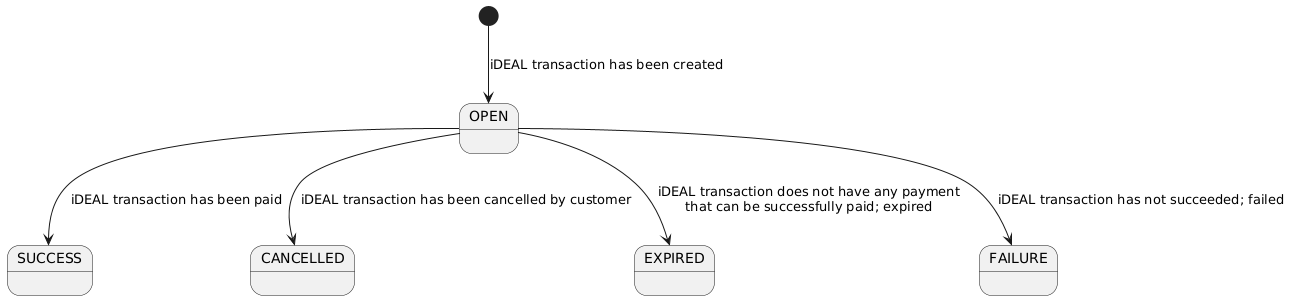
Once an iDEAL transaction has been created the status will be OPEN. While the state of an iDEAL transaction is OPEN a consumer can try to make a payment with it.
Once a payment is successful, the transaction status will transition to SUCCESS. This is the happy-flow. At this point the consumer has paid and the funds will eventually make its way to your accounts.
Of course there are other possibilities as you will have seen in the state diagram.
It could transition to CANCELLED if the consumer did not complete the payment and instead clicked on the cancel button.
It could transition to EXPIRED if the expiresAt timestamp has been reached and the transaction is still OPEN.
It could transition to FAILURE if the payment failed.
Updated 8 months ago