
Status Transitions
Klarna transaction statuses
OPEN - Transaction has been created. This is the initial status.
AUTHORIZED - Transaction payment is authorized.
SUCCESS - Transaction payment successfully paid.
CANCELLED - Transaction payment has been cancelled by your customers.
EXPIRED - Transaction payment has not succeeded; expired.
FAILURE - Transaction payment has not succeeded; unknown reason.
Status Transitions
The diagram below shows all state transitions an Klarna transaction could go through.
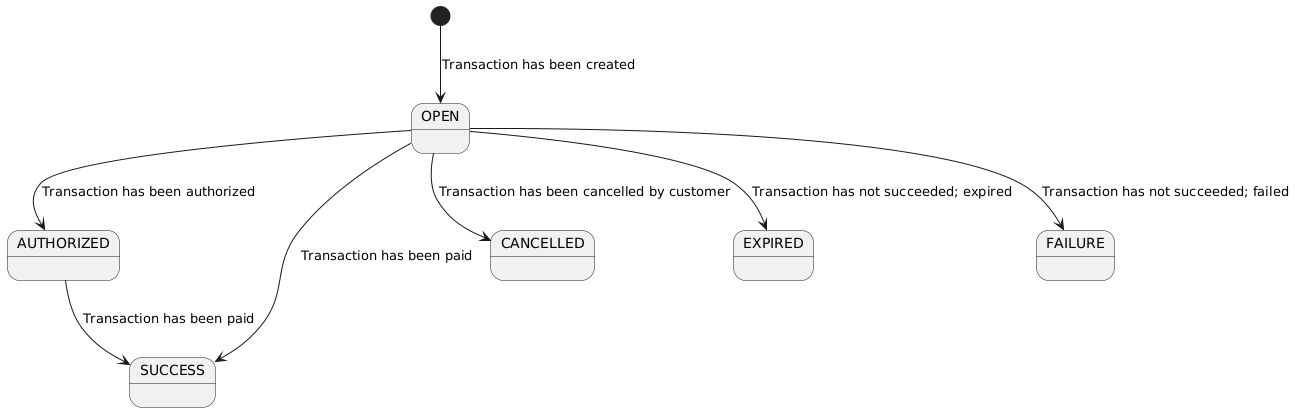
Once a Klarna transaction has been created the status will be OPEN.
You should redirect your customer to the provided redirectUrl where they can complete the payment.
Once the payment is successful, the transaction status will transition to SUCCESS. This is the happy-flow.
It can also happen that the payment of a transaction has been authorized, but not yet paid, in this case the status will be AUTHORIZED. Eventually it can transitions to SUCCESS.
Of course there are other possibilities as you have seen in the state diagram.
It could transition to CANCELLED if the consumer did not complete the payment on the Klarna environment and instead clicked on 'Return to webshop' button.
It could transition to EXPIRED if the expiresAt timestamp has been reached and the payment has not been completed.
It could transition to FAILURE if the payment failed.
Updated over 1 year ago